
Campaign Wrap-up Workspace
An analyst can turn synthetic campaign data into a brief, inspect the metrics behind it and review the report checks. This personal demo keeps Python calculations separate from optional generated prose.
- Workflow
- Data contract to stakeholder brief
- Core stack
- Python, Pandas, Streamlit, FastAPI / Pydantic
- Generation
- Optional API or deterministic fallback
My role
I set the reporting requirements, KPI rules, synthetic-data safeguards, and review criteria. I used AI coding tools extensively for implementation and iteration, then reviewed the behavior and test evidence before choosing the published scope. Inside the demo, an optional model drafts report prose from calculated evidence; Python calculates the KPIs and runs the rule-based checks.
The Reporting Problem
Reliable wrap-ups start before the narrative.
An analyst needs to explain campaign results and support recommendations with the right numbers. That starts with checking the input and calculating comparable KPIs, then shaping a report that stakeholders can review.
In this demo, the analyst can inspect the calculated numbers, the reporting guidance and the checks behind the brief. Streamlit and a local API use the same reporting functions, so the calculation rules stay consistent across both entry points.
Workflow
From synthetic CSV to a grounded wrap-up.
Each stage has one job and leaves evidence for the next stage to inspect.
Load synthetic campaign data
Start from the bundled sample CSV, a user-supplied synthetic CSV, or a local table-shaped loader that marks the future warehouse boundary.
Validate the data contract
Check required fields, date parsing, numeric values, negative values, and optional evidence before any report is produced.
Calculate KPIs in Python
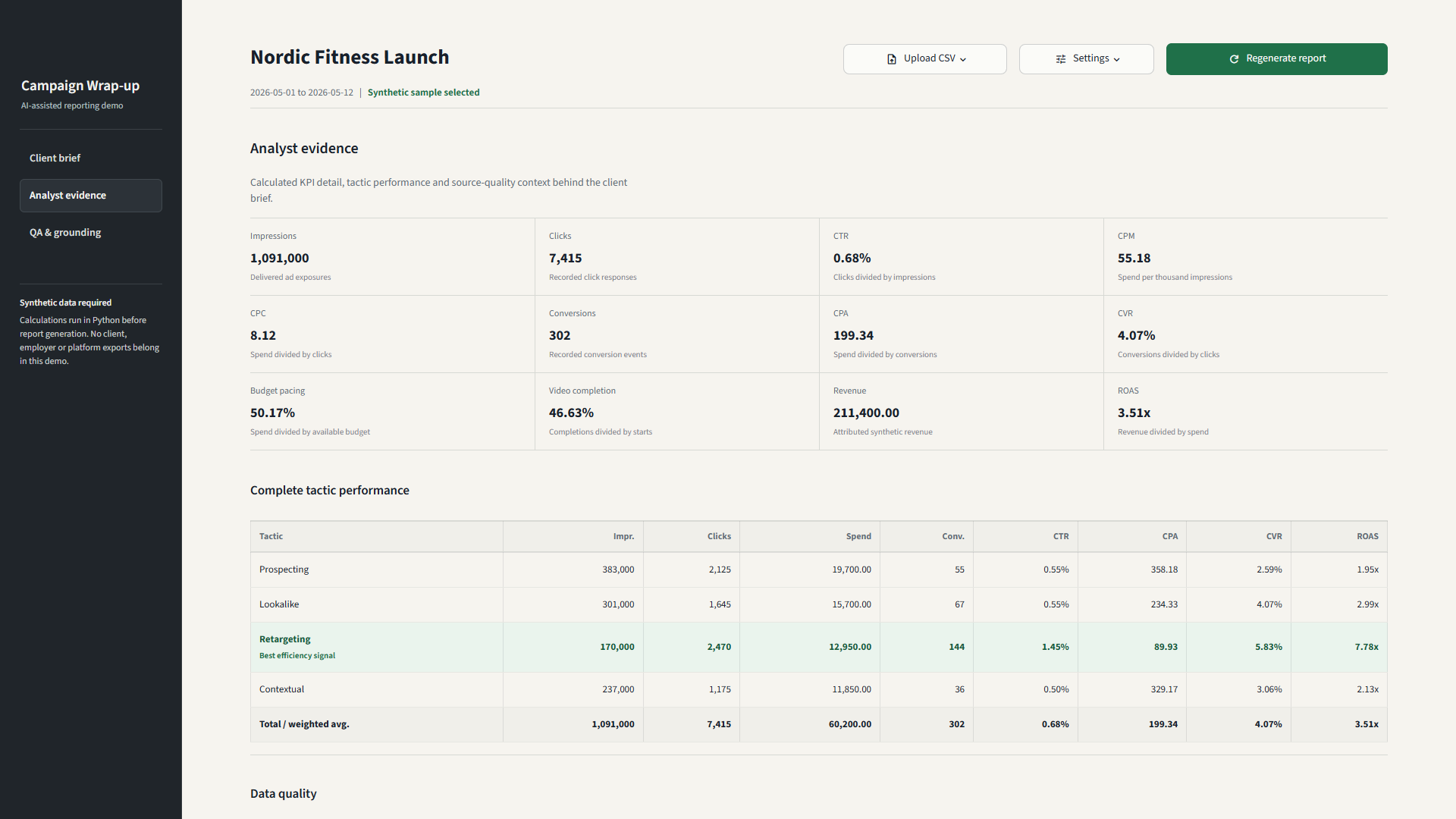
Derive delivery, CTR, CPM, CPC, CPA, CVR, pacing, video completion, and ROAS from structured data rather than model output.
Retrieve reporting guidance
Select relevant guidance from a small synthetic markdown knowledge base so the narrative receives explicit definitions and reporting rules.
Build the reporting context
Combine the calculated summary and retrieved guidance into a bounded input that can be inspected before generation.
Generate or fall back
Use optional model-backed generation when configured, or produce a deterministic offline wrap-up from the same calculated evidence.
Evaluate before review
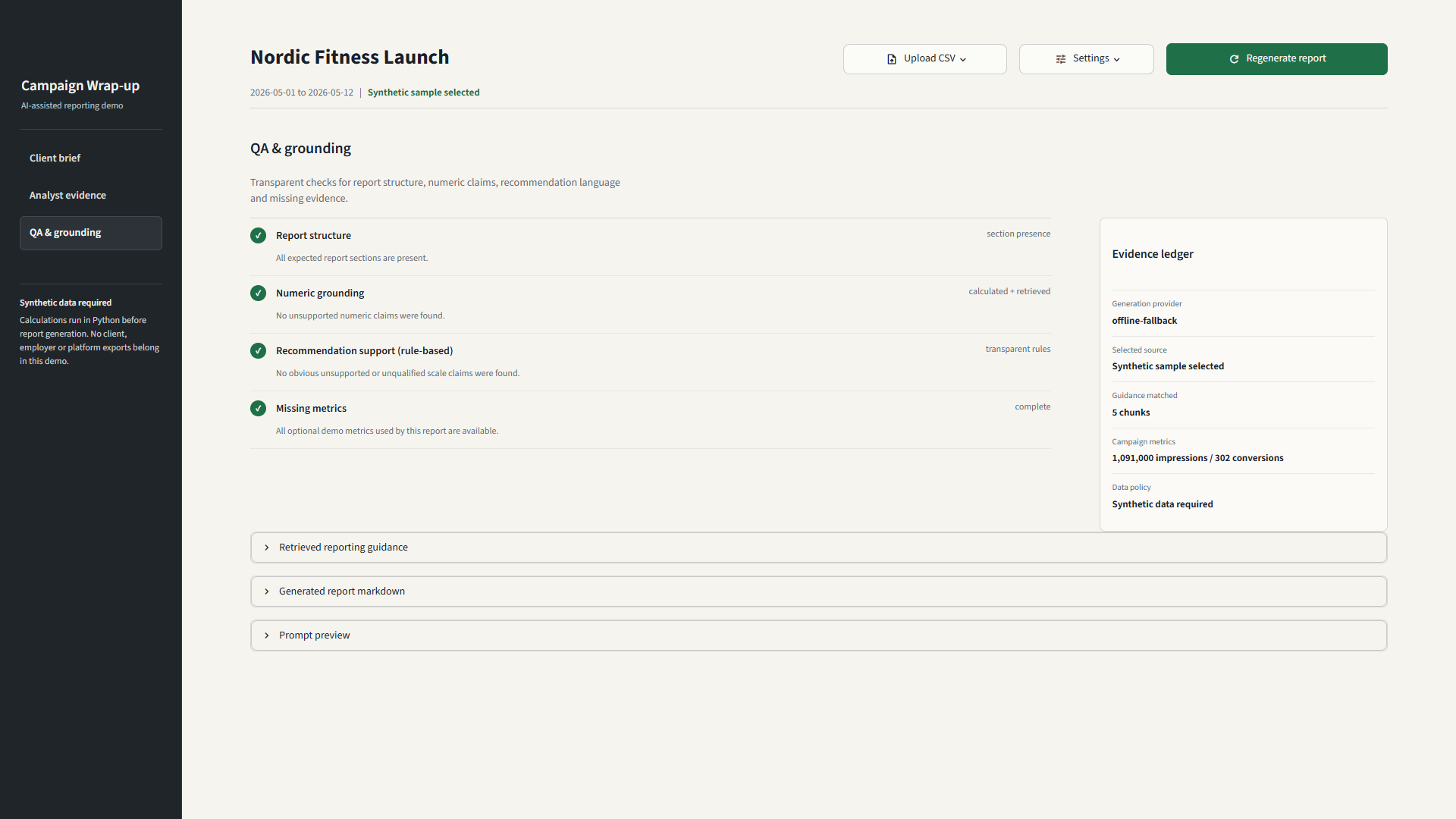
Check section coverage, numeric grounding, recommendation support, and missing metrics before presenting the client brief and analyst evidence.
Design Decisions
Keep calculation outside the language-model layer.
Python owns the numbers
KPIs are calculated from validated rows and serialized into a campaign summary. The generation layer receives those results; it is not asked to calculate or infer them from raw campaign data.
Generation owns the narrative
Retrieved guidance and calculated evidence provide a bounded context for explanation and recommendations. If model access is unavailable, the same evidence drives a deterministic report.
Evaluation remains visible
Numeric claims, expected sections, missing evidence, and recommendation language are checked separately, making failure modes easier to inspect and test.
Application boundary
One workflow, two entry points.
The Streamlit interface and typed FastAPI API use the same application functions for analysis and reporting. KPI logic does not depend on which interface starts the request.
- Streamlit or FastAPI
- Shared analysis and reporting
- Evidence and review
Analyze synthetic records
POST /api/v1/analyze accepts typed records and returns campaign and tactic KPIs, data-quality findings and retrieved guidance references.
Request a report
POST /api/v1/reports adds report prose, the provider mode and evaluation results. Offline generation is the default; optional cloud generation falls back to a deterministic report when unavailable.
Pydantic request and response models make the boundary explicit. Input errors return a structured validation response. This does not imply deployed authentication, production monitoring or a live BigQuery connector.
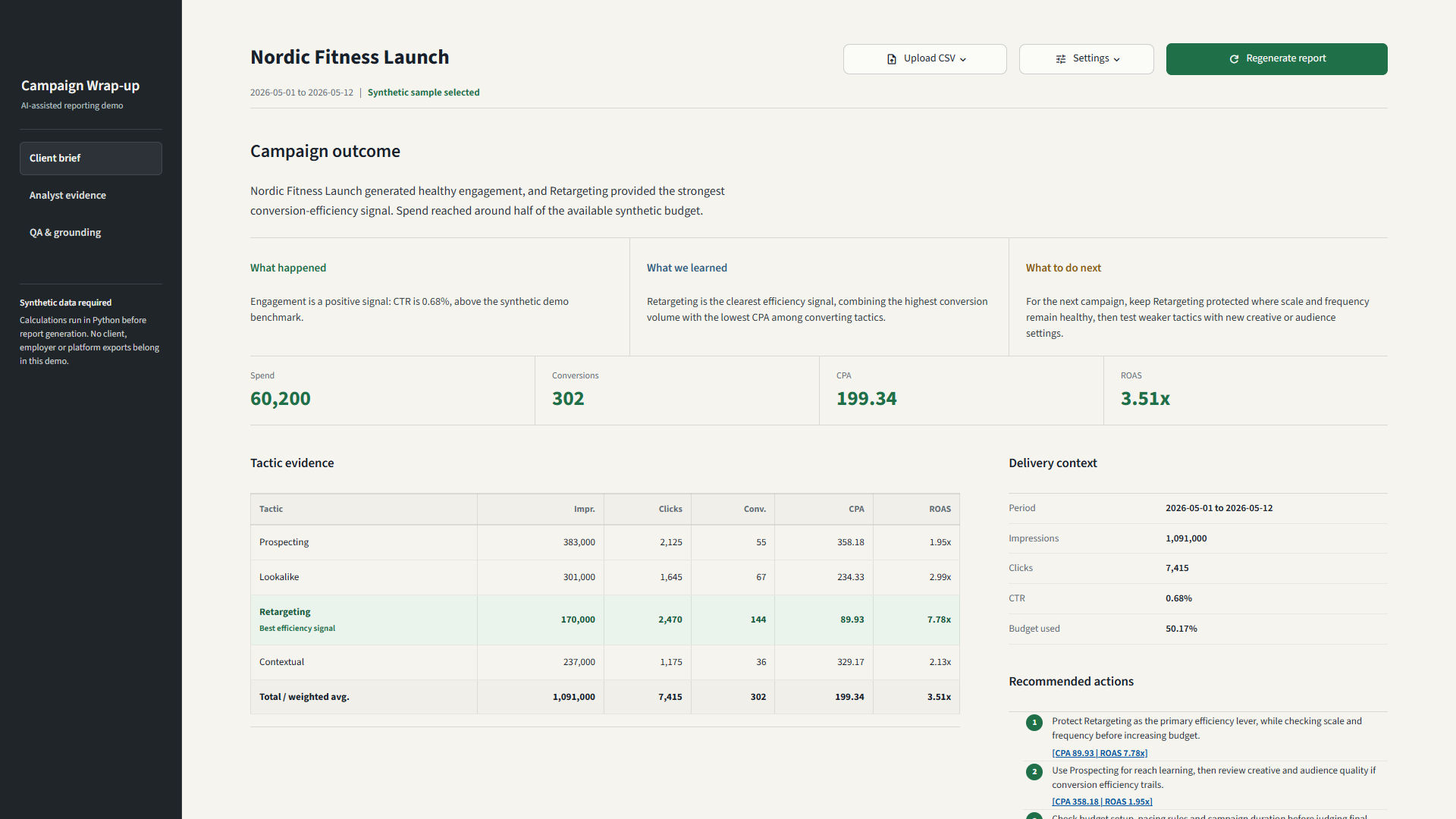
Interface Evidence
The evidence behind the client brief.
The interface separates the stakeholder summary from metric evidence and report-quality checks. Select a screenshot to open it at full size.
Safeguards and Direction
Useful offline today, explicit about production gaps.
Checks in the portfolio demo
- Required-column, date, numeric, and negative-value validation
- A calculated-number allowlist for detecting unsupported numeric claims
- Rule-based checks for unqualified budget or scale recommendations
- Explicit unavailable states for missing pacing, video, or revenue metrics
- A deterministic offline path that remains useful without an API key
Required for a production implementation
- An approved BigQuery connector with managed service-account access
- Broader report-quality evaluation and versioned reporting definitions
- Human approval before stakeholder-facing publication
- Evaluation logging, monitoring, authentication, and role-based access